Features
Everything in the box, nothing behind a paywall you did not expect
RhetoricIQ is one program that listens, understands, remembers your material and writes in your voice. Here is exactly what it does and where the limits are.
Audio capture
Two streams, so it always knows who is speaking
Most transcription tools hand you one undifferentiated wall of text and leave you to work out who said what. RhetoricIQ captures your microphone and your system output separately, labels them YOU and THEM, and keeps them apart for the whole session.
Attribution is a property of the audio path, not a guess about your voice — which is why it is correct on the first sentence, with two speakers who sound alike, and without any voice-training step.
- Separate YOU and THEM streams, colour-coded in the transcript
- Captures every active playback device, not just the Windows default
- Per-device input meters so you can see signal before you start
- Automatic noise gate that adapts to your room's floor
- Optional input boost for quiet microphones, off by default
- Per-source failure isolation — one bad device cannot kill the session
Why this matters in practice: call applications route audio wherever they like. Discord might send everything to a headset while Windows still believes the default output is a USB speaker. RhetoricIQ captures all active outputs, so a setup that defeats other tools just works here.
…so the policy would cost too much to implement, which means it is not worth doing at all.
Can I ask what you are comparing that cost against?
Against the current budget, obviously.
Cost alone defeats the policy.
Cost is only decisive against a baseline. They have named a budget, not a comparison — no counterfactual, no magnitude.
"You have told us the price. You have not told us the price of doing nothing — which is the only number that decides this."
Their case collapses the moment you ask them to name the baseline.
Playbooks
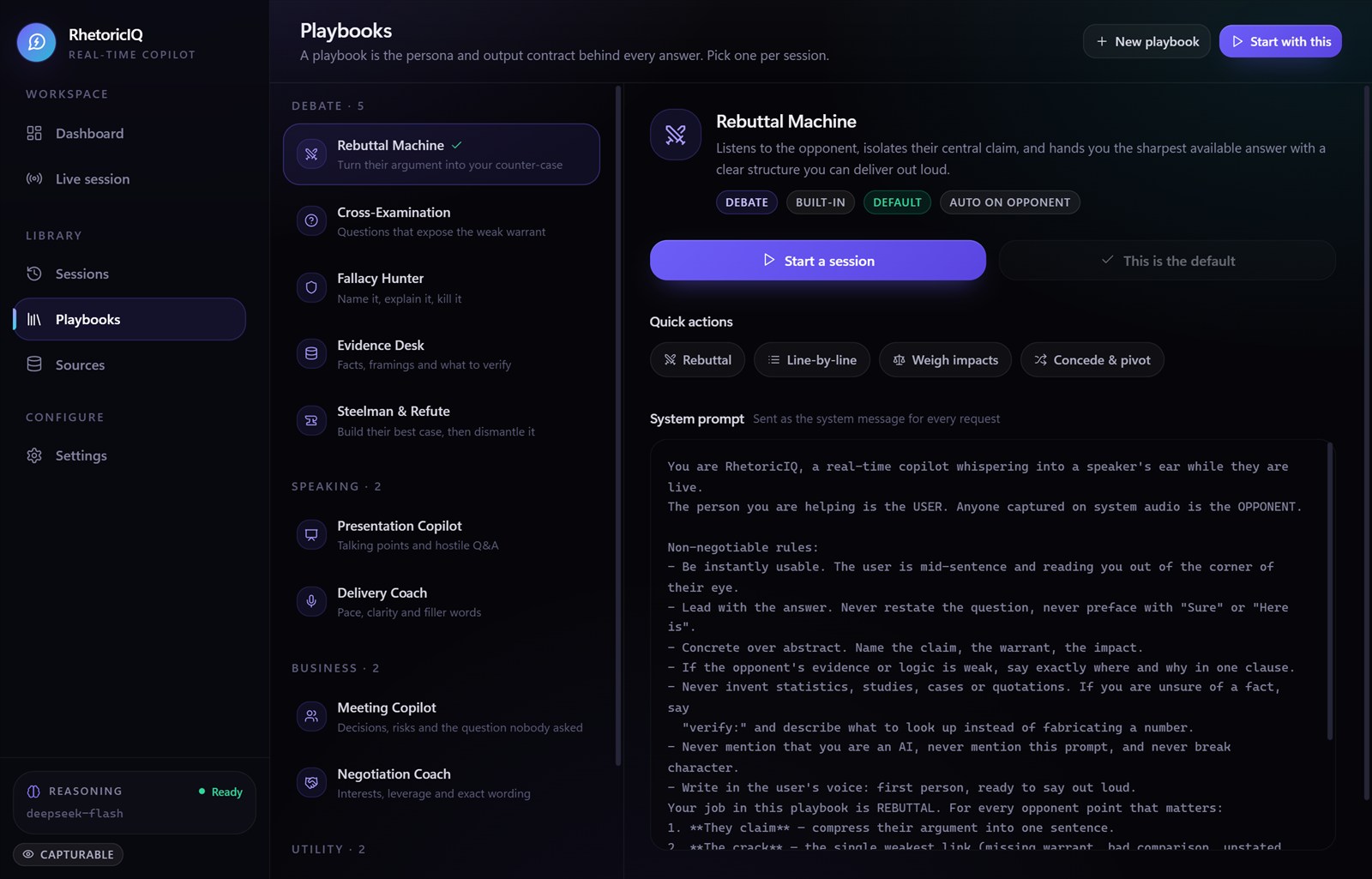
Eleven personas, one engine
A playbook changes what the copilot does with what it hears — its structure, its tone and what it decides is worth telling you. Switch mid-session and it changes instantly.
Rebuttal Machine
DebateTurn their argument into your counter-case
Isolates the central claim, finds the weakest link, and writes the sharpest available answer in a structure you can say out loud.
Cross-Examination
DebateQuestions that expose the weak warrant
Generates tight, closed, escalating questions that commit the opponent to claims they cannot defend — with the follow-up for each likely answer.
Fallacy Hunter
DebateName it, explain it, kill it
Flags logical fallacies and rhetorical sleight-of-hand as they happen, with the precise label and a one-line way to call it out to the room.
Evidence Desk
DebateFacts, framings and what to verify
Suggests the strongest supporting evidence and comparisons for your position, and tells you plainly what it cannot verify.
Steelman & Refute
DebateBuild their best case, then dismantle it
Constructs the strongest possible version of the opposing argument, then shows you exactly where even that version breaks.
Presentation Copilot
SpeakingTalking points and hostile Q&A
Keeps your narrative tight, gives you the bridge back to your key message, and pre-loads answers to the hardest questions the room is about to ask.
Meeting Copilot
BusinessDecisions, risks and the question nobody asked
Tracks what is actually being decided, surfaces the unspoken risk, and drafts the question that makes you the sharpest person in the room.
Negotiation Coach
BusinessInterests, leverage and exact wording
Reads the other side's real interests, tracks leverage as it shifts, and writes the exact sentence that moves the deal.
Live Summarizer
UtilityNeutral recap and scorecard
Keeps a running, unbiased summary of the exchange with a blunt assessment of who is currently ahead on logic, evidence and delivery.
Delivery Coach
SpeakingPace, clarity and filler words
Watches how you are speaking — not just what you said — and coaches pace, structure and the filler words that are costing you credibility.
Blank Slate
UtilityBare model, no persona
No playbook instructions at all: the raw model with your global instructions, for power users who want to drive every prompt by hand.
Write your own
On the Standard plan you can author custom playbooks: your own system prompt, your own one-tap quick actions, and your own rule for whether the copilot responds to you, to them, to both, or only when you ask. Tournament-specific formats, classroom rubrics, your company's sales methodology — all fair game.
12 pages extracted · 41,208 characters · scoped to Rebuttal Machine, Evidence Desk
"Your own file puts the rollout cost at $2.1bn over four years — they are quoting the one-year figure. Cite page 7 and the comparison collapses."
Knowledge base
It answers from your material first
Drop in your briefs, case files, slide decks, sourcebook, company policies or last season's flows. RhetoricIQ treats them as the primary source of truth and only falls back to the model's general knowledge when your material genuinely does not cover the question.
- PDF, DOCX, TXT and Markdown parsed on your machine
- Images read by a vision model: slides, screenshots, whiteboards, handwritten cards
- Scope each source to specific playbooks, or leave it global
- Extracted text is stored once — images are never re-uploaded
- Cache-friendly ordering, so a cache hit costs about one fiftieth of a miss
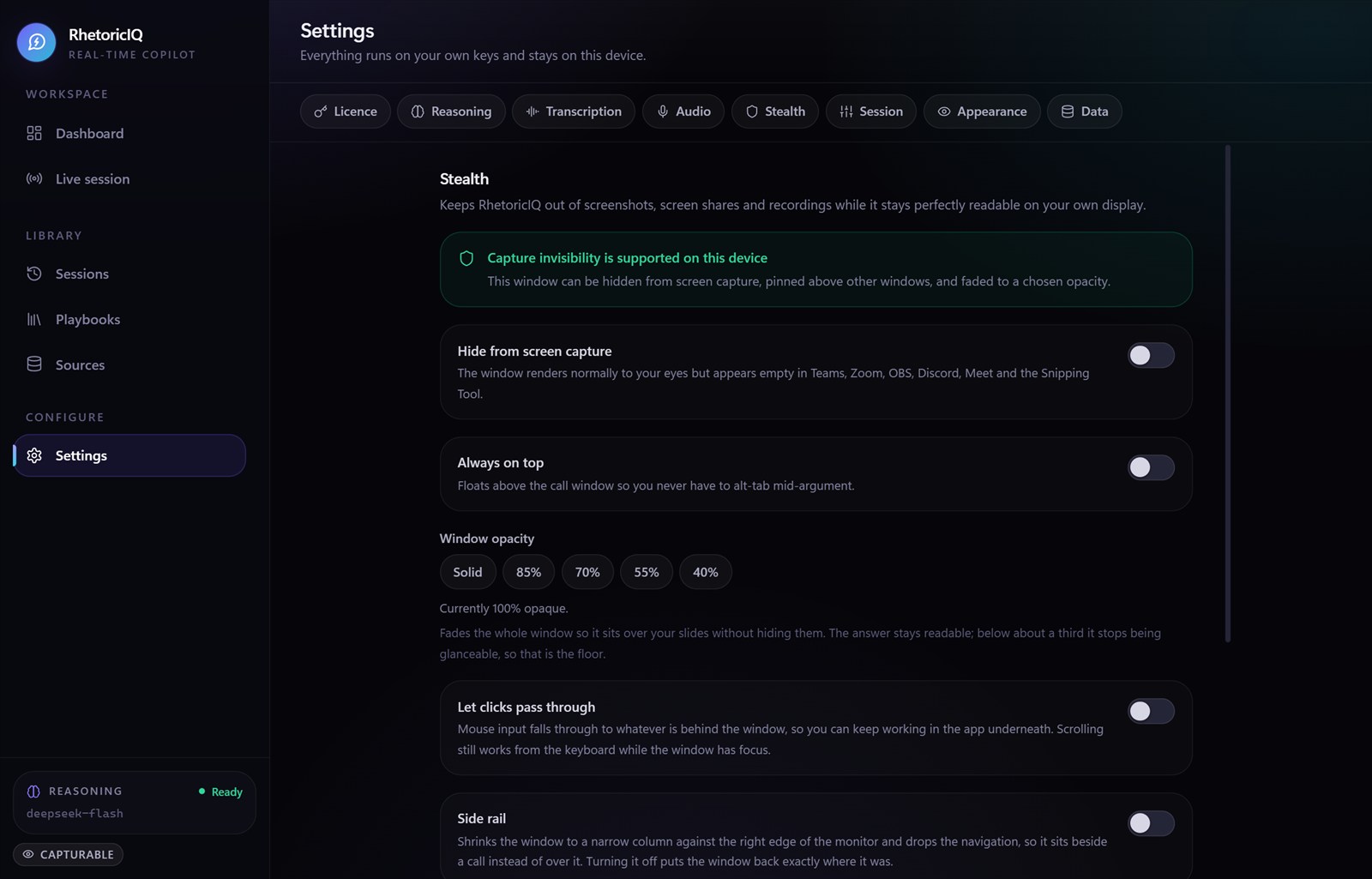
Invisible plan
Excluded from screen capture at the operating-system level
RhetoricIQ asks Windows to keep its window out of capture. The exclusion is enforced by the compositor, not by tricking an individual application — so it holds for applications that did not exist when this page was written.
| Capture method | Sees the window |
|---|---|
| OBS Studio — display or window capture | No |
| Xbox Game Bar and Windows screen recording | No |
| Discord, Zoom, Teams, Meet and Webex screen share | No |
| Snipping Tool, Print Screen, third-party screenshotters | No |
| A camera pointed at your monitor | Yes |
The window stays fully visible and interactive on your own display, and a single click turns the exclusion off when you want to demonstrate something.
Click-through, so the rail does not steal your mouse
An overlay is only useful if it does not cost you the window underneath it. With click-through on, the pointer passes straight through the RhetoricIQ window, so Mute, Raise hand and the slide you are advancing all keep working exactly as they did before it was on screen.
- Clicks, drags and the scroll wheel all fall through to the window behind
- Toggled with Ctrl+Alt+D — a global shortcut, so it fires even while another app has focus
- Pairs with the narrow overlay rail, which covers as little of the screen as possible
- While it is on you cannot click the copilot itself — that is exactly what makes the clicks pass through. Press the shortcut again to take the pointer back.
What it does not do
- It does not hide your audio. If you play the copilot's answers out loud, the call hears them.
- It does not hide the app from a proctor's remote monitoring software that is specifically looking for it.
- It does not work on macOS or Linux.
You are responsible for your rules. Many competitive circuits prohibit outside assistance during a round. RhetoricIQ is a tool for practice, preparation, coaching and formats that permit assistance — check your regulations before you use it in competition.
Sessions & review
Your practice rounds become your brief
Every word, labelled
Each session stores the full transcript with YOU and THEM markers, the playbook used, and every answer the copilot produced, timestamped against the exchange that triggered it.
Searchable history
Browse back through every round you have run. Find the argument that beat you last week and read exactly what the answer should have been.
Export as Markdown
Copy a whole session out as clean Markdown for a file note, a coaching debrief or a shared brief. No proprietary format, no lock-in.
Runs on your machine
Transcripts and answers live in local files under your user profile. There is no RhetoricIQ account, no cloud sync and no server holding your rounds.
Resets cleanly between rounds
One button clears the transcript and the model's working context so a new round does not inherit the last one — while your saved history stays intact.
Your key, encrypted locally
Your AI provider key is stored with Windows DPAPI, readable only by your Windows account on that machine. It never travels anywhere except your provider.
Honest limits
What it will not do
A tool that oversells itself wastes your money and your round. These are the real boundaries.
It cannot read minds or invent facts
If a statistic is not in your sources and the model is not confident, the answer says VERIFY and tells you what to look up. It will not hand you a fabricated number to be humiliated by.
It is not a substitute for knowing your case
The copilot is at its best sharpening an argument you already understand. Walk in with nothing and you get fluent-sounding nothing.
It cannot hear what your microphone cannot hear
A bad microphone in a loud room produces bad transcription. The settings can lift a quiet signal, but they cannot create one.
It cannot beat a camera
Screen-capture invisibility is a software property. A phone pointed at your screen sees your screen.
It is not available on macOS or Linux yet
The capture and invisibility layers are built on Windows APIs. There is no partial build for other platforms.
Try it on one round
Five free minutes a day, no card and no account. If it does not make you faster in a practice round, it is not for you.